How to create the roof multifaceted: Difference between revisions
Jump to navigation
Jump to search
(→Solution: - dodanie filmiku) |
|||
| Line 16: | Line 16: | ||
}} | }} | ||
==Problem description== | ==Problem description== | ||
* Multifaceted roof create using ''<IS_TS id=AddRoofEdge/>''. | * Multifaceted roof create using component ''<IS_TS id=AddRoofEdge/>''. | ||
* Icon of component is available in the ''2D Editor'' window on the ''<IS_TS id=NarzedziaGlowne/>'' bar in the ''<IS_TS id=lystrFloors/>'' section when the ''<IS_TS id=lystrFloors/>'' editing scope is enabled.<br/>[[File:TB-add-roof-edge-location.png|900 px|left|thumb|1. ''<IS_TS id=AddRoofEdge/>'']]<br clear="all"/> | * Icon of component is available in the ''2D Editor'' window on the ''<IS_TS id=NarzedziaGlowne/>'' bar in the ''<IS_TS id=lystrFloors/>'' section when the ''<IS_TS id=lystrFloors/>'' editing scope is enabled.<br/>[[File:TB-add-roof-edge-location.png|900 px|left|thumb|1. ''<IS_TS id=AddRoofEdge/>'']]<br clear="all"/> | ||
* The program highlights in red edge of the roof, which is diagnosed impossible to present in ''<IS_TS id=View3D/>''. | * The program highlights in red edge of the roof, which is diagnosed impossible to present in ''<IS_TS id=View3D/>''. | ||
Latest revision as of 14:26, 3 November 2016
| Product | InstalSystem 5 |
| Type of article | TYPICAL PROBLEM |
| Source for translation | IS 5.0 Beta 35 |
Problem description
- Multifaceted roof create using component Add roof edge.
- Icon of component is available in the 2D Editor window on the Main tools bar in the Construction section when the Construction editing scope is enabled.
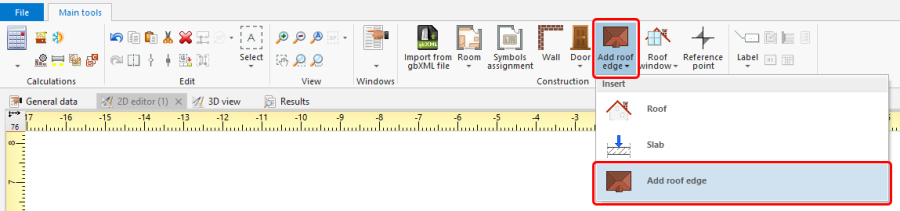
1. Add roof edge - The program highlights in red edge of the roof, which is diagnosed impossible to present in 3D view.

Solution
Use the AUTO and ORTO modes.