How to create the roof multifaceted: Difference between revisions
Jump to navigation
Jump to search
(Created page with "{{Article table |commercial_product1=InstalSystem 5 |p2 =<!--gdy jest kolejny produkt handlowy, zamienić na->"produkt_handlowy2="--> |p3 =<!--...") |
|||
| Line 16: | Line 16: | ||
}} | }} | ||
==Problem description== | ==Problem description== | ||
* Multifaceted roof create using ''<IS_TS id=AddRoofEdge/>''. | |||
* Icon of component is available in the ''2D Editor'' window on the ''<IS_TS id=NarzedziaGlowne/>'' bar in the ''<IS_TS id=lystrFloors/>'' section when the ''<IS_TS id=lystrFloors/>'' editing scope is enabled.<br/>[[File:TB-add-roof-edge-location.png|900 px|left|thumb|1. ''<IS_TS id=AddRoofEdge/>'']]<br clear="all"/> | |||
* The program highlights in red edge of the roof, which is diagnosed impossible to present in ''<IS_TS id=View3D/>''. | |||
* | |||
==Solution== | ==Solution== | ||
* Specify smaller pipe feed arrangement spacing. | * Specify smaller pipe feed arrangement spacing. | ||
Revision as of 12:06, 3 November 2016
| Product | InstalSystem 5 |
| Type of article | TYPICAL PROBLEM |
| Source for translation | IS 5.0 Beta 35 |
Problem description
- Multifaceted roof create using Add roof edge.
- Icon of component is available in the 2D Editor window on the Main tools bar in the Construction section when the Construction editing scope is enabled.
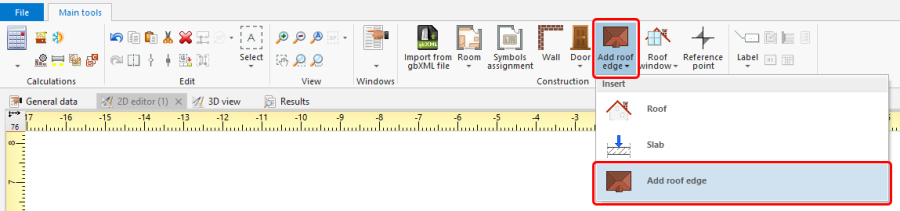
1. Add roof edge - The program highlights in red edge of the roof, which is diagnosed impossible to present in 3D view.

Solution
- Specify smaller pipe feed arrangement spacing.
- Change manner of Pipe feeds route component arrangement.
- Increase width of Pipe feeds route component arrangement area.
- Draw pipe feeds manually.
Depending on design circumstances, or when pipe feeds cannot be generated automatically, the tool for manual arrangement of pipe feeds can be used.
For more information, see: [[{{{link}}}]] Manual pipe feeds editing.