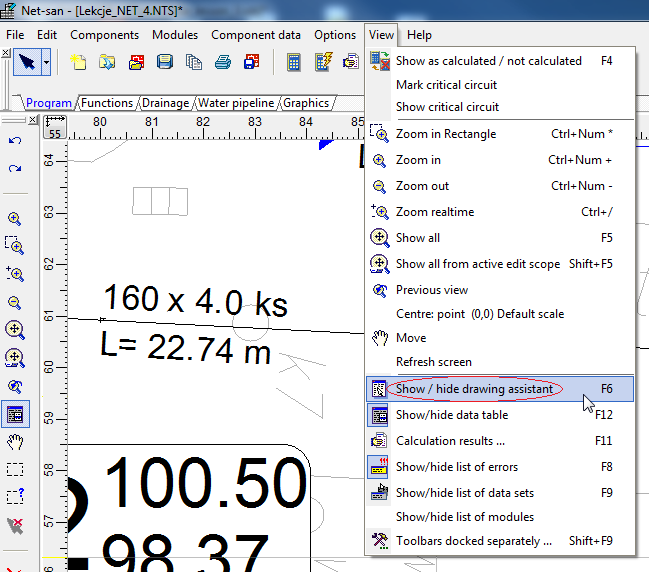
Drawing assistant is funcionality avaiable in the package InstalSystem 4 and NetSystem 4.
It supports system designing, enables drawing or inserting into the project elements at a predetermined distance and at a given angle in addition to an already existing element in the project: imported base, building construction or other. It also allows the imposition of a drawn length of the pipe-run or a section of the network.
Location in the program
Drawing assistant can be triggered by:
function key F6
toolbar View / Show/hide drawing assistant .
1. Selection drawing assistant from menu
Drawing assistant window will appear, which contains the following information:
Δx, Δy - increase from the initial section of the network
L - length of current section
Angle - the angle of intersection with the x axis
Help lines - are visible when "Auto" is selected.
Example of use
Insert the network section of the specified length at Net-san
Turn off AUTO mode.
Select the right type of network and start drawing section in selected location.
To draw a section of example 5 m enter the desired length in Assistant drawing field "L [m]".
Finish drawing the section.
2. Drawing the section of predetermined length
Attention! To kept section length turn off AUTO mode.
Insert the section at a given angle to the existing network section at Net-san
Turn on AUTO mode.
Select the right type of network and start drawing section in the selected location.
To draw a section for example 90º enter the angle in the drawing assistant in the field "Angle of add. crossing help line [º]".
Using the appearing help lines deflected at a given angle, finish drawing the section.
3. Drawing the section at a given angle
Attention! To help lines were visible turn on AUTO mode.
Insert the section parallel to the wall of a building in Instal-therm
Turn on AUTO mode.
To draw a parallel section from the existing wall by a distance eg. 0.2 m enter the desired distance in the drawing assistant in the field "Dist. of add. parallel help line [m]".
Select the right type of the section before the beginning of drawing invade the cursor over the wall to which the sectiont is to be drawn parallel (without selecting).
Start drawing section in the desired location using the displayed help lines.
Finish drawing the section.
File:Parallel.png4. Drawing the section parallel to the wall with appropriate distance
Attention! To help lines were visible turn on AUTO mode.
Video - Drawing the section at a given angle and parallel
 .
.